

Learn what an IPTV encoder box is, how it works, use cases, features, setup, and how to choose the best IPTV encoder for streaming.
Introduction
With the rapid growth of online video streaming, IPTV technology has become a core solution for broadcasters, content creators, hotels, and businesses. One of the most essential components in professional IPTV systems is the IPTV encoder box.
An IPTV encoder box converts video signals from sources such as HDMI, SDI, or AV into IP streams that can be distributed over the internet or local networks. These devices are widely used for live TV broadcasting, IPTV services, hotel TV systems, corporate streaming, and educational platforms.
This in-depth professional guide explains everything you need to know about IPTV encoder boxes. You will learn how they work, their features, types, use cases, setup process, and how to choose the best IPTV encoder for your needs.
What Is an IPTV Encoder Box?
An IPTV encoder box is a hardware device that takes a video input and converts it into a digital IP stream that can be transmitted over a network. The encoded stream can then be delivered to IPTV servers, media players, smart TVs, or streaming platforms.
Main Purpose of an IPTV Encoder
- Convert video signals into IP format
- Compress video using modern codecs
- Stream content over LAN or internet
- Enable live broadcasting
Unlike IPTV players, encoder boxes are used on the broadcasting side, not the viewer side.
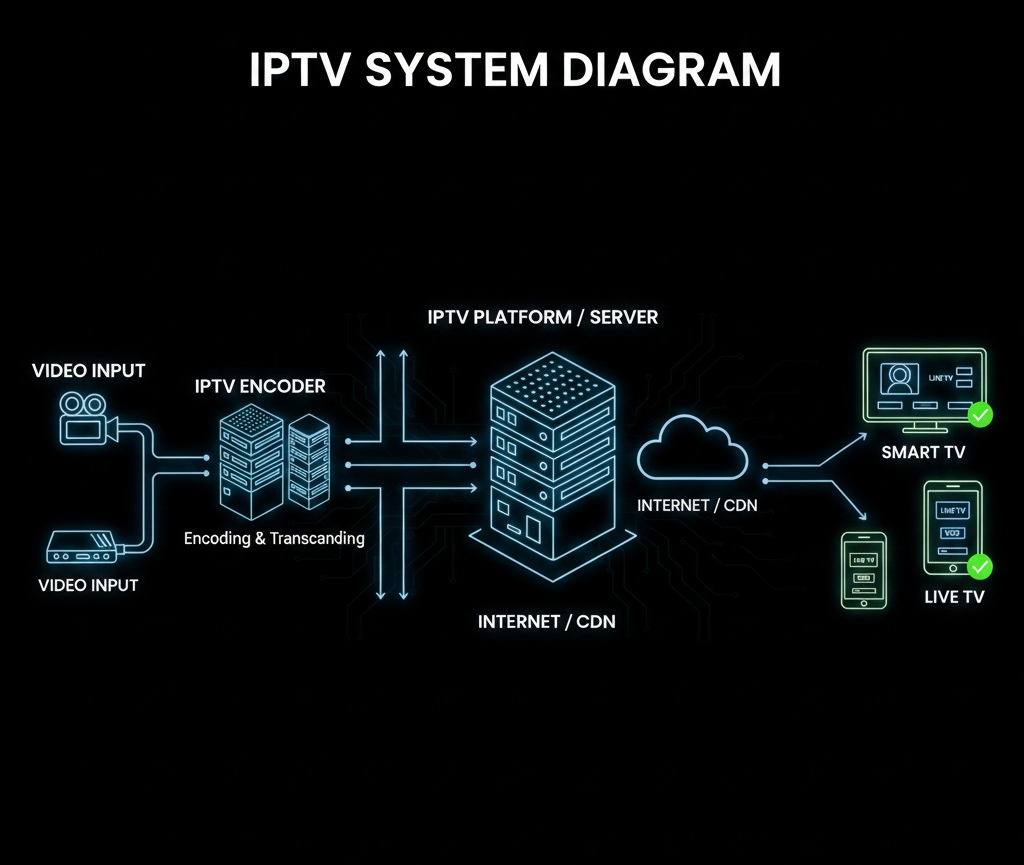
How an IPTV Encoder Box Works
The operation of an IPTV encoder box follows a structured process.
Step-by-Step Process
- Video Input
The encoder receives video from:- HDMI
- SDI
- AV (RCA)
- VGA
- Video Encoding
The device compresses the video using codecs such as:- H.264 (AVC)
- H.265 (HEVC)
- Audio Encoding
Audio is encoded using formats like:- AAC
- MP3
- IP Streaming Output
The encoded stream is sent via:- RTSP
- RTP
- UDP
- HTTP
- HLS
- Distribution
The stream is delivered to IPTV middleware, servers, or directly to users.
Types of IPTV Encoder Boxes
IPTV encoders come in different types depending on usage and input format.
1. HDMI IPTV Encoder Box
- Most common type
- Used with set-top boxes, cameras, PCs
- Ideal for live TV and presentations
2. SDI IPTV Encoder Box
- Used in professional broadcasting
- Supports long-distance signal transmission
- High reliability and quality
3. Multi-Channel IPTV Encoder
- Supports multiple inputs
- Used by TV stations and hotels
- Reduces hardware costs
4. Portable IPTV Encoder
- Compact and lightweight
- Used for mobile broadcasting
- Ideal for events and field reporting
Key Features of an IPTV Encoder Box
A professional IPTV encoder box offers advanced features.
Video Features
- HD and Full HD support
- 4K support (high-end models)
- Adjustable bitrate
- Resolution scaling
Audio Features
- Stereo audio
- Multi-audio channel support
- Audio-video synchronization
Network Features
- Ethernet connectivity
- Multicast and unicast streaming
- VLAN support
- Static IP configuration
Management Features
- Web-based control panel
- Remote management
- Firmware updates
- User authentication
How does IPTV work A Complete Beginner’s Guide
Common Use Cases for IPTV Encoder Boxes
1. IPTV Service Providers
Used to encode live TV channels for IPTV distribution.
2. Hotels and Hospitality
Hotels use IPTV encoders to distribute:
- Live TV
- Promotional content
- In-room information
3. Corporate Streaming
Businesses use encoders for:
- Internal communications
- Training sessions
- Live events
4. Education and E-Learning
Schools and universities stream:
- Lectures
- Campus TV channels
- Online classes
5. Religious and Community Broadcasting
Churches and community centers broadcast live events.

IPTV Encoder Box vs IPTV Transcoder
Many people confuse encoders with transcoders.
IPTV Encoder
- Converts raw video into IP stream
- Used at the source
IPTV Transcoder
- Converts one encoded format to another
- Used for optimization and compatibility
Both devices can be used together in large IPTV systems.
Supported Streaming Protocols
A good IPTV encoder box supports multiple protocols.
Most Common Protocols
- RTSP
- RTP
- UDP
- HLS
- HTTP
- ONVIF (for cameras)
Protocol choice depends on:
- Network type
- Latency requirements
- Number of viewers
How to Set Up an IPTV Encoder Box
Step 1: Connect Video Source
Use HDMI or SDI cable to connect:
- Camera
- Satellite receiver
- Media player
Step 2: Connect Network
- Connect Ethernet cable
- Assign IP address
Step 3: Access Web Interface
- Enter encoder IP in browser
- Log in using admin credentials
Step 4: Configure Encoding Settings
- Resolution
- Bitrate
- Codec
- Frame rate
Step 5: Configure Streaming Protocol
- Choose RTSP, UDP, or HLS
- Set multicast or unicast mode
Step 6: Test the Stream
- Open stream in VLC or IPTV software
- Verify audio and video quality

Hardware Specifications to Consider
When choosing an IPTV encoder box, check:
Important Specs
- Input types
- Max resolution
- Codec support
- Network speed (100Mbps / 1Gbps)
- Power consumption
- Cooling system
Build Quality
- Metal casing
- Heat dissipation
- Industrial-grade components
Best IPTV Encoder Box Applications
IPTV encoders integrate with:
- IPTV middleware platforms
- Video management systems
- CDN networks
- OTT platforms
- Hotel TV systems
Security Features in IPTV Encoder Boxes
Common Security Options
- Password-protected access
- IP access control
- Encrypted streams (HTTPS)
- Firewall compatibility
Security is critical for professional broadcasting environments.
IPTV Encoder Box Pricing Overview
Prices vary depending on features.
Price Ranges
- Entry-level: $100 – $300
- Mid-range: $300 – $800
- Professional: $800 – $3000+
Cost depends on:
- Number of channels
- Video quality
- Brand reliability
Advantages of Using an IPTV Encoder Box
Key Benefits
- Real-time streaming
- High-quality video
- Scalable distribution
- Professional reliability
- Long-term cost savings
Limitations of IPTV Encoder Boxes
Common Limitations
- Initial hardware cost
- Technical setup required
- Needs stable network
- Requires maintenance
IPTV Encoder Box Maintenance Tips
Best Practices
- Keep firmware updated
- Monitor temperature
- Backup configuration settings
- Test streams regularly
Frequently Asked Questions (FAQ)
What does an IPTV encoder box do?
It converts video signals into IP streams for IPTV distribution.
Can I use an IPTV encoder at home?
Yes, but it’s mainly designed for professional use.
Does an IPTV encoder support live streaming?
Yes, live streaming is its primary function.
Is an IPTV encoder legal?
Yes, as long as you stream content you own or have rights to.
Future of IPTV Encoder Technology
The future of IPTV encoders includes:
- AI-based compression
- Lower latency streaming
- 4K and 8K support
- Cloud-based management
- Energy-efficient designs
Conclusion
An IPTV encoder box is a critical component in any professional IPTV or streaming setup. Whether you are an IPTV provider, hotel operator, broadcaster, or enterprise user, choosing the right encoder ensures high-quality, reliable, and scalable video distribution.
By understanding how IPTV encoder boxes work and selecting the right model for your needs, you can build a powerful and future-proof IPTV system.